
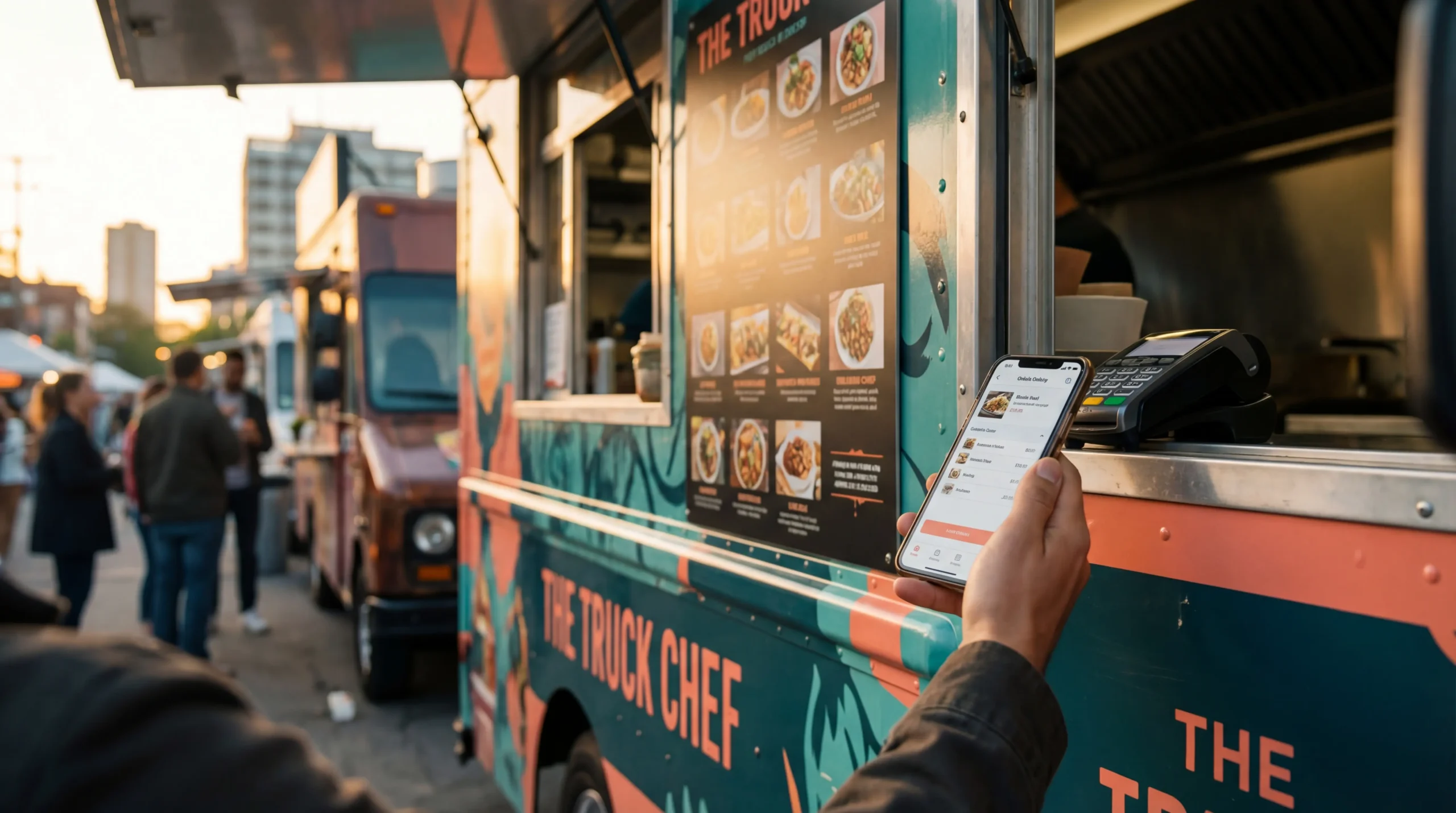

The U.S. food truck industry is valued at roughly $1.4–$1.5 billion, and apps now sit at the center of how trucks find customers — and how customers find trucks. When I evaluated over a dozen food truck mobile app options before choosing a stack for our three-truck operation, the differences in features, pricing, and actual ROI were far wider than I expected.
Bottom line: Food truck mobile apps fall into four distinct categories — finder apps for locating trucks, ordering apps for managing sales, POS systems with mobile integration, and custom-branded apps for building your own platform. The right combination depends on whether you’re a hungry customer or an owner looking to grow revenue. This guide compares 15 options across all four categories so you can make a data-informed decision.
📚 Part of our complete Food Truck Tech guide.
What Food Truck Mobile Apps Actually Do (And Why They Matter)
If you’re asking is there a food truck app that connects vendors with hungry customers — the answer is yes, and there are now over a dozen solid options across multiple categories. A food truck mobile app is any smartphone application that bridges the gap between food truck operators and customers, whether that means showing a truck’s live GPS location, accepting pre-orders, processing payments, or managing loyalty programs.
From an operational standpoint, mobile apps address several revenue leaks that many food truck owners don’t quantify. Missed walk-up customers who couldn’t locate your truck, lost sales from cash-only operations, and zero repeat-visit data are all problems that the right app solves.
Based on my testing across multiple platforms and price points, most food truck owners end up using a combination of two to three apps rather than a single all-in-one solution — a finder app to get discovered, a POS system for payments, and a social media platform for marketing.
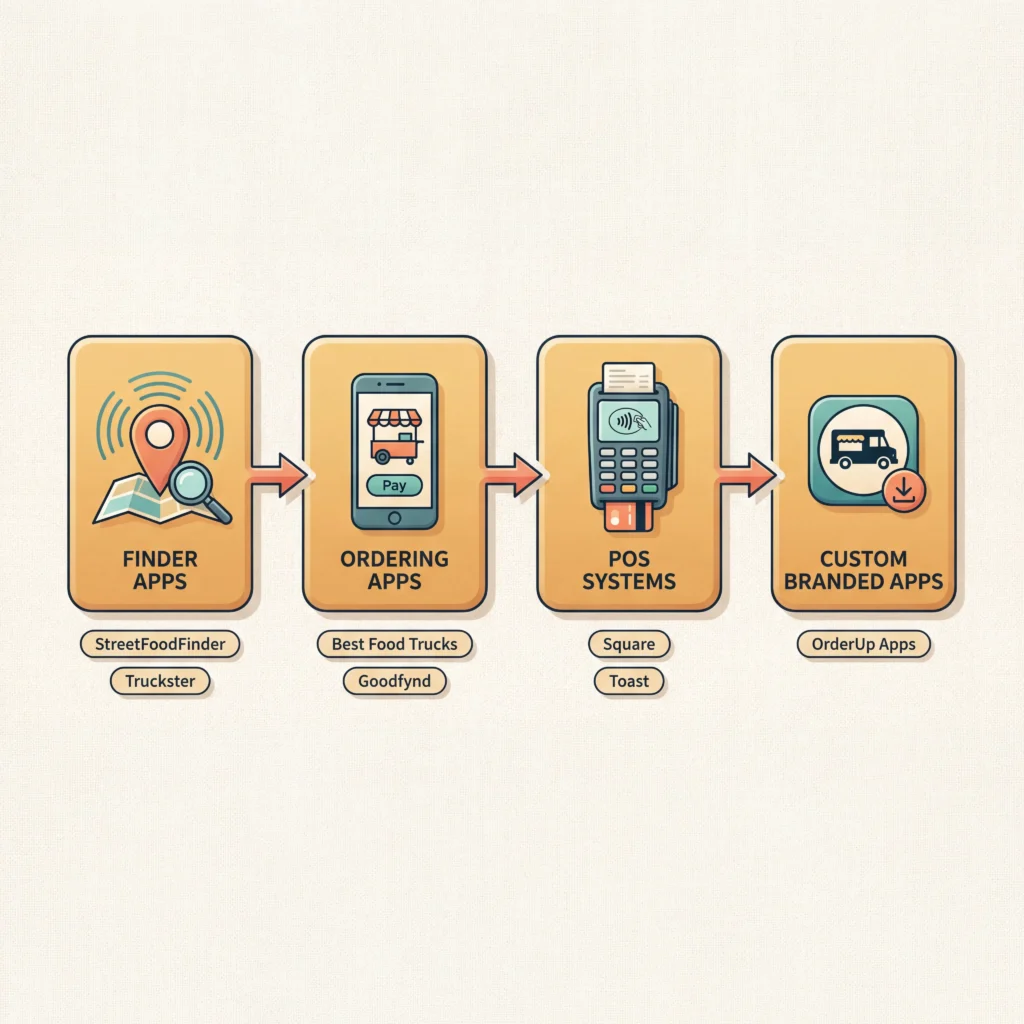
The food truck app market breaks into four categories, and understanding the distinction matters before you spend anything:
- Finder apps help customers locate trucks on a map (StreetFoodFinder, Truckster, Mobile Nom)
- Ordering and pre-order apps let customers place and pay for orders ahead of time (Best Food Trucks, OrderUp Apps, Goodfynd)
- POS systems with mobile integration handle payments, inventory, and reporting (Square, Toast, Table Needs)
- Custom-branded apps give your truck its own downloadable app in the App Store and Google Play (OrderUp Apps)
Each category serves a different function, and most successful operators I’ve worked with layer at least two together. If you’re still deciding which POS system fits your operation, start there — it’s the foundation everything else connects to.
Food Truck Finder Apps for Customers
If you’ve ever searched for an app to find food trucks near you, these are the platforms designed specifically for that purpose. They function like a map-based directory where customers can browse, filter, and discover trucks in real time.
StreetFoodFinder
The largest food truck finder platform currently available, with coverage on iOS, Android, and web. StreetFoodFinder offers real-time GPS locations, menus with photos, customer reviews, event listings, and alerts when your favorite trucks are nearby. Online ordering is built directly into the platform. Free for customers, and free basic listings for truck owners.
Truckster
A map-based finder with filtering by day, time, and menu type. Truckster stands out for its loyalty rewards program — customers earn cash back by ordering regularly — and its catering search feature, which makes it easy for event planners to find trucks for hire. Strong presence in metro markets. Free for customers.
Mobile Nom
Covers both the customer and owner side of the equation. Mobile Nom offers a free starter plan for owners, with paid tiers for enhanced promotion and visibility. The platform also includes event venue listings alongside truck locations, making it useful for both truck operators and event organizers looking to book mobile vendors.
Kraven
A newer finder focused on removing the guesswork from locating food trucks, functioning as a map-based tool for foodies. User base is smaller than StreetFoodFinder or Truckster, but growing steadily in select markets. Best suited for customers in cities where Kraven has an established truck network.
TruckFindr
Combines location finding with mobile ordering and delivery. TruckFindr is compatible with some POS systems, allowing orders to flow into your system in real-time — a feature most other finder apps lack. If you need a single platform that handles both discovery and ordering, this is worth evaluating.
For truck owners, the strategic value of these finder apps is visibility. Listing your truck on multiple platforms increases the chances a hungry customer discovers you. Most platforms are free or low-cost for basic listings, so the ROI calculation is straightforward: if even a few extra customers per week find you through the app, the time investment pays for itself.
The limitation is reach. None of these apps have the user base of a Google Maps or Yelp, so they work best as a supplement to your broader food truck locator strategy rather than a primary discovery channel.
💡 Pro Tip from Marcus: I list our trucks on three different finder platforms simultaneously. The time to set up profiles is roughly two hours total, and each platform feeds a slightly different customer segment. It’s worth considering that even small finder apps can drive repeat customers who wouldn’t have found you otherwise.
Online Ordering and Pre-Order Apps for Food Truck Owners
Online ordering is where food truck mobile apps have the biggest direct impact on revenue. These platforms function as a food truck menu app and ordering system combined, letting customers browse your full menu, place orders, and pay — all before they walk up to your window.
Best Food Trucks (BFT)
One of the more feature-rich options in this category. Beyond basic ordering, BFT includes automated 86’ing (when an item sells out online, it’s automatically removed from your menu), pre-orders up to 60 days in advance, guaranteed minimum features for new locations, machine learning upsells that prompt customers to add items at checkout, and wireless kitchen printing. BFT also manages lunch and dinner locations and helps fill catering requests. Payment processing goes directly to your bank account — no third-party intermediary. Pricing is commission-based through their booking platform.
Goodfynd
A newer entrant positioning itself as a direct competitor to Square and Toast, specifically built for mobile food vendors. Their platform combines POS functionality with a customer-facing ordering interface and vendor discovery. Worth evaluating if you’re comparing all-in-one solutions that handle both operations and customer acquisition.
EasyEats
Focuses on simplifying the ordering process for both food trucks and small restaurants. EasyEats positions itself with a comparison-friendly interface against larger POS platforms, making it a potential fit for owners who want ordering capability without the complexity of a full POS ecosystem.
The data suggests that pre-ordering reduces average wait times and increases order value — customers who order through an app tend to add more items than walk-up customers, partly because they browse the full menu rather than ordering under time pressure.
📎 Related: If you’re evaluating apps specifically for locating trucks, see our app to locate food trucks breakdown.
Food Truck POS Systems with Mobile App Integration
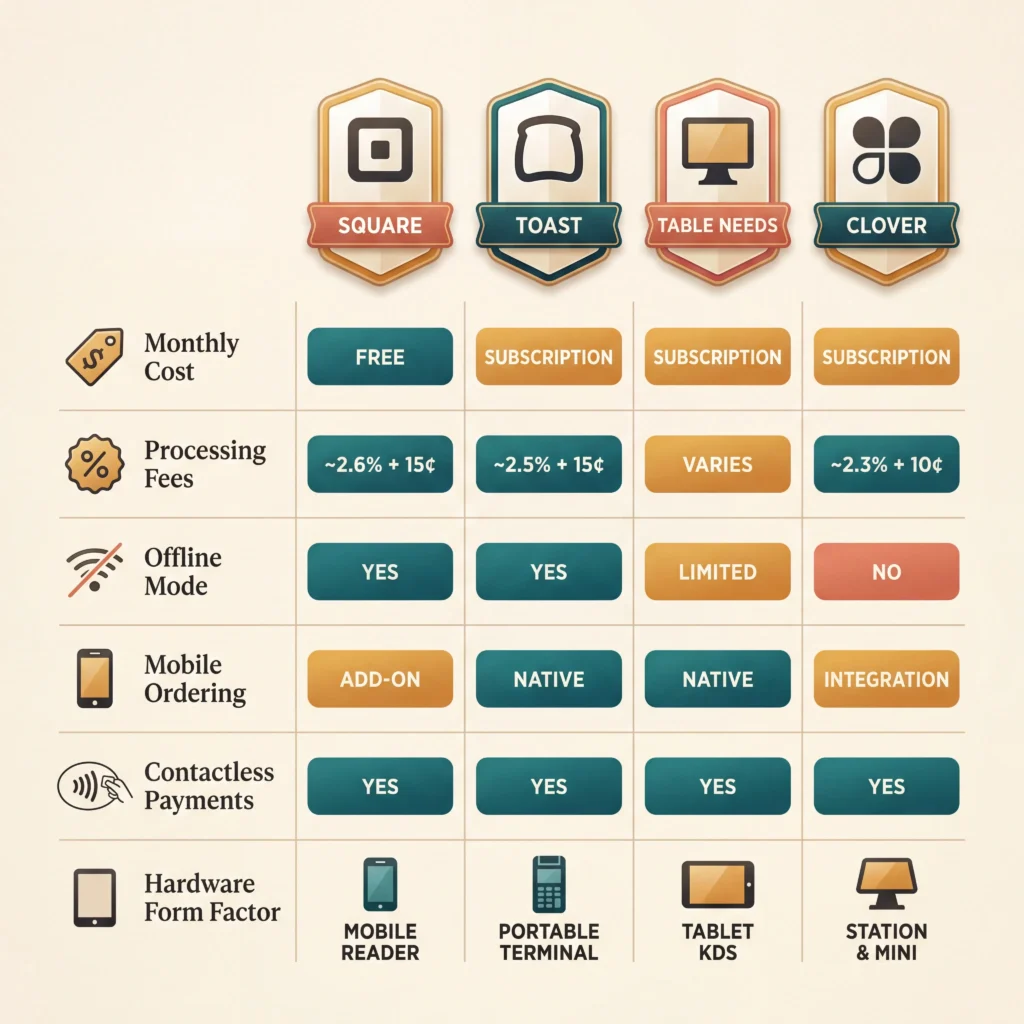
Point-of-sale systems are the operational backbone for most food truck businesses, and the best ones now include mobile app integration for both customer ordering and owner management. One critical factor specific to food trucks: offline mode. Signal drops at festivals, outdoor events, and rural locations are common, so your POS needs to handle transactions even without internet.
Square
The most widely adopted POS for food trucks — and the starting point I recommend for new operators. The basic plan is free, hardware is affordable and compact, and Square accepts Apple Pay, Google Pay, and contactless payments. Processing fees run 2.6% + $0.15 per in-person transaction. Square also integrates with third-party apps like OrderUp for custom ordering solutions. Offline mode is available, allowing you to accept payments when cell signal drops.
Toast
Built specifically for food service businesses, Toast offers strong mobile functionality with hardware designed for on-the-move operations. The platform includes online ordering, menu management, and reporting. Pricing starts higher than Square, with monthly software fees plus processing costs. Toast also supports offline payment processing. A strong fit if you want an all-in-one system without layering multiple apps.
Table Needs
A mobile POS that includes inventory management, ordering, and a kitchen display system (KDS). Table Needs is designed for smaller operations and provides a streamlined interface that works well in tight food truck spaces. Monthly subscription pricing — contact provider for current rates.
Clover
Some food truck owners adopt Clover, though it’s more commonly associated with brick-and-mortar restaurants. It integrates with certain food truck ordering apps but lacks the mobile-specific features and offline reliability that Square or Toast provide for on-the-go operations.
For the question of whether food trucks take Apple Pay — yes, virtually all modern POS systems (Square, Toast, Clover, Table Needs) support NFC contactless payments including Apple Pay and Google Pay. This is essentially table stakes in 2026.
💡 Pro Tip from Marcus: When I ran the numbers on 12 different POS systems, the total cost difference over a year — factoring in hardware, software fees, and processing rates — varied by well over a thousand dollars between the cheapest and most expensive options. Don’t just compare monthly fees. Build a 12-month model using your average transaction size and daily volume, then compare total cost of ownership.
📎 Related: For a deeper analysis, see our full POS systems for food trucks comparison.
Custom-Branded App Solutions: Your Own App in the App Store
This is the category most food truck owners don’t know exists — and it’s where the biggest competitive advantage hides. Instead of relying on third-party finder or ordering apps, you can have your own fully branded app published in both the Apple App Store and Google Play.
OrderUp Apps is currently the most visible platform in this space, specifically built for food truck owners. The app features include mobile ordering with Square POS integration, push notifications and text messaging, GPS live tracking, loyalty points and coupons, order stacking (spacing out pickup times so you’re not overwhelmed), a built-in kitchen display system, DoorDash delivery integration without standard DoorDash fees, and an IVR phone system that handles incoming calls automatically.
Pricing is straightforward: $99.99 per month plus a one-time development fee of $899. There are no transaction fees or delivery surcharges — a flat monthly cost regardless of order volume. Setup typically takes 24–48 hours after signup.
The strategic logic here is compelling. Third-party finder apps distribute customers across every food truck on the platform. Your own branded app creates a direct communication channel with your customers — push notifications go only to people who downloaded your app, and every order builds your customer database rather than someone else’s.
According to a testimonial featured on OrderUp’s website, one operator reported roughly 30% higher sales after adoption — though independent verification of individual results is limited, and outcomes will depend heavily on your market, cuisine, and customer base.
The trade-off is cost. For a new food truck with limited revenue, committing to roughly $2,100 in the first year (development fee plus 12 months) is a meaningful expense. But for an established truck doing consistent volume, the math works quickly — even a modest increase in order frequency from push notifications and loyalty points can exceed the monthly cost. While results vary significantly, the economics tend to favor adoption for trucks processing a consistent daily volume.
Food Truck Marketing and Social Media Apps
Marketing apps don’t handle orders or payments, but they drive the visibility that feeds everything else. For food trucks, these platforms are particularly important because your location changes daily — and customers need to know where to find you.
Instagram remains the strongest visual marketing channel for food trucks. In my experience with three trucks, the content that performs best isn’t polished photography — it’s close-up prep videos showing food being assembled, short Reels of the service window during a rush, and raw behind-the-scenes shots of daily operations. Posting 4–5 times per week with at least 2 Reels consistently outperforms posting daily static images. Location stories are essential on service days so followers know exactly where you are.
TikTok is where food content goes viral. The most successful food truck accounts focus on preparation process shots, unique menu items, and customer reaction content. A single strong video can reach millions of views. The investment is time, not money — but the learning curve on what TikTok’s algorithm rewards (raw authenticity over polish) trips up many food truck owners who try to make their videos too clean.
MailChimp enables email marketing campaigns — weekly location announcements, menu updates, and special event promotions. For food trucks that serve regular routes, a weekly email to subscribers is one of the highest-ROI marketing activities available. Free up to 500 contacts, then paid tiers apply.
Truckily sits between a marketing app and a finder app. It enables one-click location updates to social media platforms and manages your schedule. Useful for owners who want to automate the repetitive “we’re here today” social media post that most truck operators dread writing every morning.
The data suggests that combining a finder app listing with active social media and an email list creates three separate discovery channels. When I evaluated our own customer acquisition sources, social media drove roughly 40% of new customers, finder apps brought in about 25%, and word-of-mouth plus email covered the rest. These are estimates from our own tracking — your numbers will vary by market and cuisine type.
📎 Related: For a comprehensive marketing strategy, see our food truck marketing strategy guide.
Food Truck Mobile Apps Compared: Features, Pricing, and Best Use Case
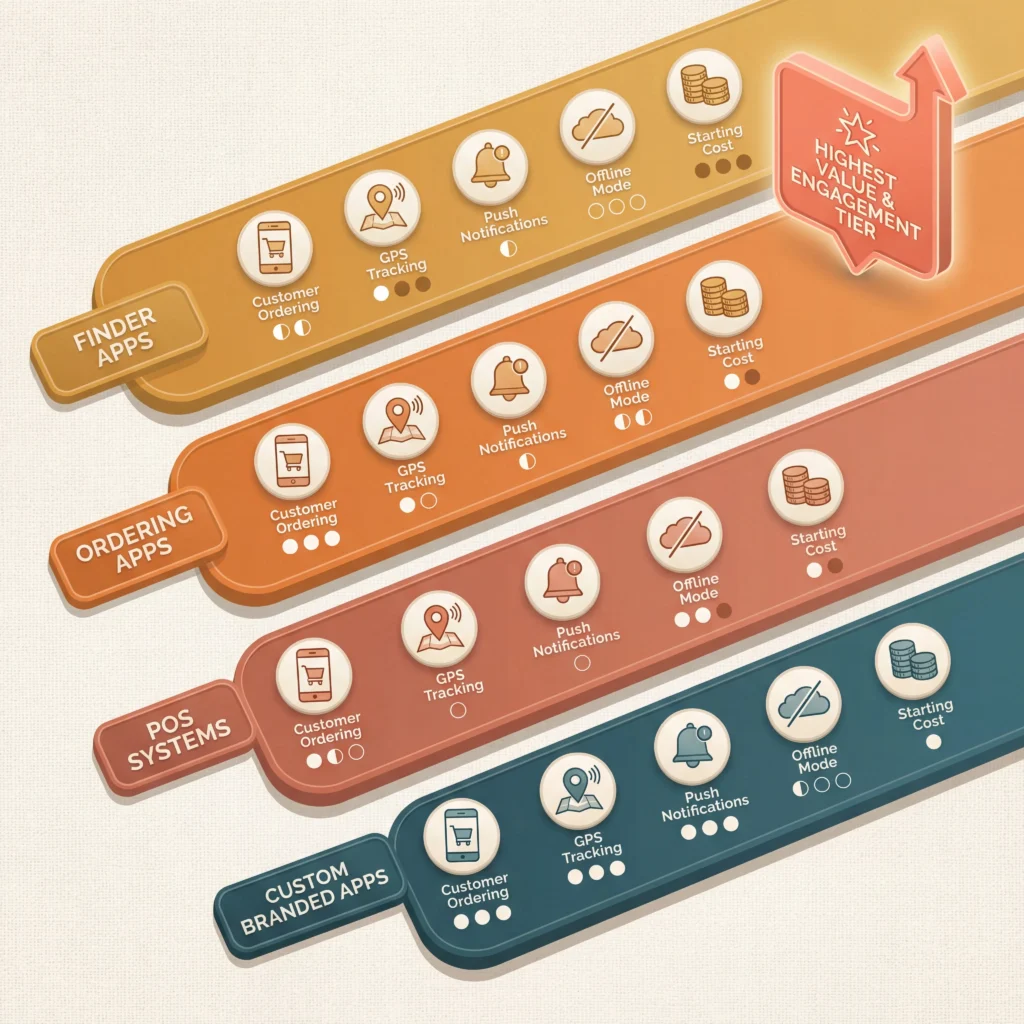
No guide currently provides a side-by-side comparison of all these apps in one place. Based on my evaluation across platforms and price points, here’s how the major options stack up across the criteria that matter most to food truck owners.
Finder Apps at a Glance
| App | Platform | Customer Ordering | GPS Tracking | Reviews | Cost for Owners |
|---|---|---|---|---|---|
| StreetFoodFinder | iOS, Android, Web | Yes | Yes | Yes | Free basic listing |
| Truckster | iOS, Android | Limited | Yes | Yes | Free basic listing |
| Mobile Nom | iOS, Android | No | Yes | Limited | Free starter, paid tiers |
| Kraven | iOS, Android | No | Yes | No | Free |
| TruckFindr | iOS, Android | Yes | Yes | No | Free basic |
Ordering, POS, and Custom App Comparison
| App | Mobile Ordering | POS Integration | Push Notifications | Offline Mode | Starting Cost |
|---|---|---|---|---|---|
| Best Food Trucks | Yes | Own system | Yes | N/A (web-based) | Commission-based |
| OrderUp Apps | Yes | Square, Clover | Yes | Via Square | $99.99/mo + $899 setup |
| Square POS | Yes (add-on) | Native | No (without add-on) | Yes | Free plan available |
| Toast POS | Yes | Native | Limited | Yes | ~$0/mo (Starter) + processing |
| Table Needs | Yes | Native | Limited | Contact provider | Monthly subscription |
| Goodfynd | Yes | Native | Yes | Contact provider | Contact for pricing |
These tables represent features as of early 2026. Pricing and feature availability change frequently, so verify current details directly with each provider before committing.
💡 Pro Tip from Marcus: The bottom line on this comparison is that there’s no single “best” food truck mobile app. The right stack depends on your business stage. A new truck with limited budget starts with Square (free) plus StreetFoodFinder listings (free). An established truck doing consistent volume should evaluate OrderUp or BFT for ordering, and consider adding Truckster and Mobile Nom for wider discovery.
How to Choose the Right Food Truck App
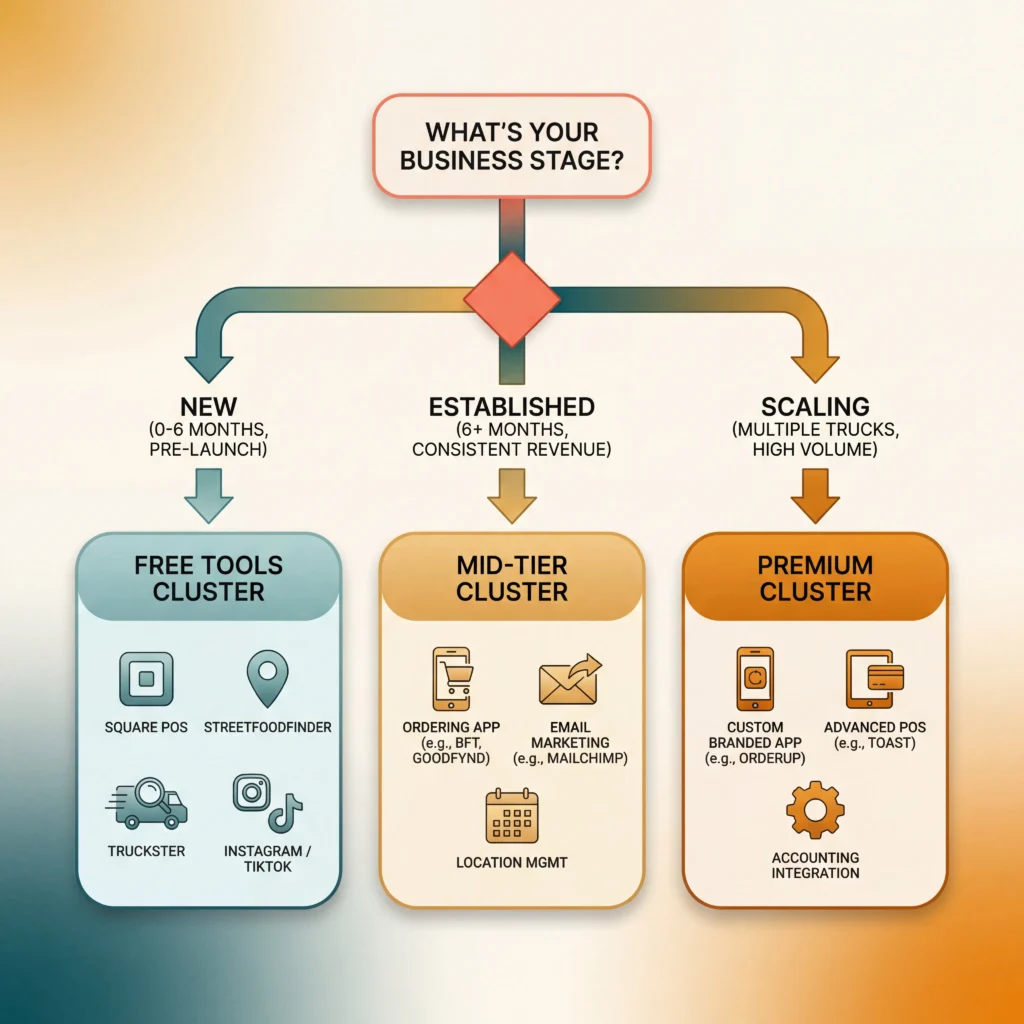
With over a dozen options available, the decision can feel overwhelming. Based on my experience helping operators evaluate their technology stack, the selection process comes down to three variables: your business stage, your budget, and your primary goal.
If you’re just starting out (pre-launch or first 6 months): Focus on free tools. Square POS for payments, StreetFoodFinder and Truckster for discovery, Instagram for marketing. Total monthly cost: $0 in software (just processing fees on transactions). Get volume first, then invest in paid tools.
If you’re established and growing (6+ months, consistent revenue): Layer in online ordering. Evaluate BFT or Goodfynd for their ordering and location management features. Add MailChimp for email marketing. This is also the stage where a custom-branded app starts to make financial sense — run the numbers on OrderUp’s $99.99/month against your projected increase in order frequency.
If you’re scaling (multiple trucks or high-volume single truck): This is where a dedicated POS like Toast and a custom app through OrderUp deliver the most ROI. The combination of branded ordering, push notifications, loyalty programs, and kitchen display integration creates an operational advantage that free tools can’t match. You also need your food truck accounting software to integrate with whatever POS you choose.
The critical mistake I see operators make is adopting too many apps too early. Each app requires setup time, ongoing management, and mental overhead. Start lean, measure what drives actual revenue, and add tools as the data justifies the investment.
Full disclosure — I tend to over-analyze this stuff. I spent weeks building comparison spreadsheets when a simple Square setup would have gotten us rolling sooner. Don’t let perfect be the enemy of good.
The Real Cost of Food Truck Apps: What to Budget

Pricing transparency is rare in this space, so here’s what the numbers actually look like based on my research:
Free tier (budget: $0/month in software): Square POS (free plan) + StreetFoodFinder listing + Truckster listing + Instagram/TikTok marketing. You’ll pay processing fees on transactions (currently 2.6% + $0.15 per swipe) but nothing for the software itself. This covers basic payments, some discoverability, and social marketing.
Mid-tier (budget: roughly $50–$150/month): Add Toast or a paid Square tier for advanced features like online ordering and loyalty programs. Add MailChimp (free up to 500 contacts, then paid tiers). Add BFT for ordering and location management. This tier gives you ordering capability and better customer data.
Premium tier (budget: roughly $150–$300/month): Custom-branded app through OrderUp ($99.99/month ongoing, plus $899 one-time setup). Plus your POS subscription. Plus potentially paid tiers on finder apps for featured placement. This tier gives you complete control over the customer relationship — your brand, your data, your communication channel.
The ROI calculation is specific to your operation. If your average ticket is $15 and a custom app generates even 3 additional orders per day through push notifications and pre-orders, that’s roughly $45/day or $1,350/month in incremental revenue — well above the $100 monthly cost. While results vary, the math tends to favor app adoption for trucks doing consistent daily volume.
📎 Related: For a full find a food truck app overview from the customer perspective, see our dedicated guide.
FAQ: Food Truck Mobile Apps
What is the best food truck app for finding trucks near me? StreetFoodFinder is currently the largest and most widely used food truck finder app, available on iOS, Android, and web. Truckster is a strong alternative with additional features like loyalty rewards and catering search. For the broadest coverage, download both — they index different trucks in different markets, and both are free for customers.
What is the best POS system for a mobile food truck? It depends on what you need. Square is the best starting point for most food trucks — the free plan covers payment processing, basic reporting, and offline mode, with no monthly software cost. Toast is the better choice if you want built-in online ordering, advanced reporting, and a platform specifically designed for food service. The deciding factor is usually whether you want a simple payment tool (Square) or a complete restaurant management system (Toast).
Is there a free food truck app for owners? Yes. Square POS offers a free plan that covers basic payment processing and sales reporting. StreetFoodFinder and Truckster both offer free basic listings for truck owners. Instagram, TikTok, and Google Calendar are free marketing and scheduling tools. You can build a functional tech stack at zero monthly software cost — processing fees on transactions are the only unavoidable expense.
Can I get my own branded food truck app in the App Store? Yes. OrderUp Apps builds fully custom-branded apps published under your truck’s name in both the Apple App Store and Google Play. Pricing is $99.99 per month plus an $899 one-time development fee. The app includes mobile ordering, push notifications, GPS tracking, loyalty programs, and Square POS integration. Setup typically takes 24–48 hours after signup.
Do food trucks accept Apple Pay and mobile payments? Virtually all food trucks using modern POS systems (Square, Toast, Clover, Table Needs) accept Apple Pay, Google Pay, and other NFC contactless payments. If a food truck only accepts cash, they’re likely not using a POS system at all. Contactless payment support is essentially standard across all current food truck technology platforms.
How much does it cost to add online ordering to a food truck? Costs range from free to roughly $100+ per month. Square offers basic online ordering on paid tiers. Best Food Trucks provides ordering through a commission-based model. OrderUp Apps charges a flat $99.99/month with no per-transaction fees. The total cost depends on your order volume — flat-fee models become more cost-effective as daily order counts increase, while commission models cost less at lower volumes. Processing fees for in-person payments are separate and typically run 2.6% + $0.15 per transaction on Square.
Final Thoughts
The food truck mobile app market in 2026 offers more options than ever — and the right combination can meaningfully impact your revenue and operations. Here’s what the data points to.
Key Takeaways:
- Start with free tools (Square + finder app listings + social media) and add paid solutions only when your volume justifies the cost
- Finder apps drive discovery, but ordering apps drive revenue — prioritize ordering capability as soon as your operation is stable
- Custom-branded apps (OrderUp) represent the highest ROI for established trucks, giving you direct customer relationships instead of renting attention on third-party platforms
- No single app does everything — plan for a stack of 2–3 tools that cover payments, discovery, and customer communication
- Total monthly cost for a comprehensive app stack ranges from $0 (free tier) to roughly $200–$300 (premium), depending on your needs and stage
Your Next Steps:
- For evaluating POS systems for food trucks, see our detailed comparison
- For understanding all your options to find a food truck app, check our customer-focused guide
- For the bigger picture on food truck technology decisions, return to our complete Food Truck Tech guide
The tools exist. The costs are manageable. The math favors adoption for any truck doing consistent volume. Run the numbers on your own operation, start lean, and scale your tech stack as the data supports it.
— Marcus Reyes
